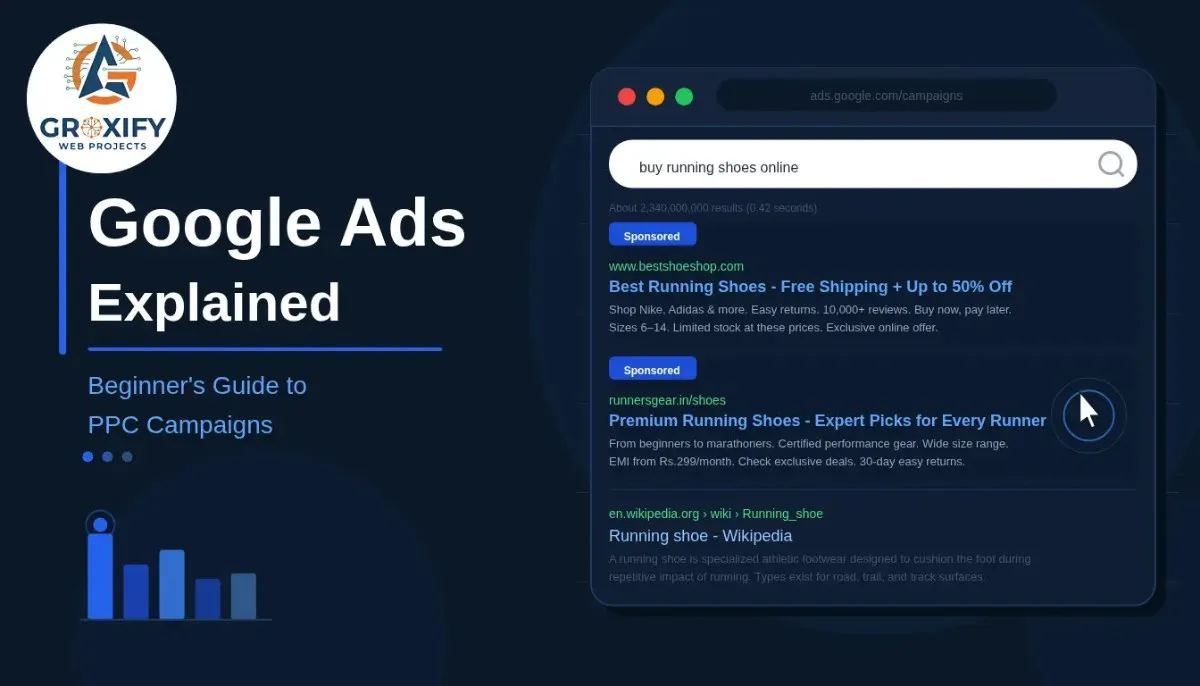
You open Google, search for something, and the first two or three results have a small “Sponsored” label next to them. Most people scroll past. Some click. That business just paid for that click. That is Google Ads in its simplest form — an advertising platform where businesses pay to show up exactly when someone is searching for what they offer.
Most beginners either overthink it before starting or jump in without understanding how it works. Both paths waste money. This guide covers everything: how the auction works, what the different campaign types do, what you realistically pay, and what separates campaigns that bring real results from ones that quietly drain your budget.
How Google Ads Actually Works
Every time someone types something into Google, an auction happens in milliseconds. Advertisers who have set up ads for related keywords compete for that placement. But here is the part most beginners do not expect — the highest bidder does not always win.
Google uses something called Ad Rank to decide which ads show and where. Ad Rank depends on three things: your bid (how much you are willing to pay per click), your Quality Score (a 1-to-10 rating of how relevant your ad and landing page are to the search), and the expected impact of additional information you attach to your ad.
Quality Score looks at three things: how likely people are to click your ad, how closely your ad matches what someone searched, and how useful your page is after someone arrives. A business with a lower bid but highly relevant ads can outrank a competitor spending double. That is intentional. Google wants searchers to find useful results, not just whoever has the deepest pockets.
What CPC Actually Means
Google Ads falls under a model called PPC — Pay Per Click. You only pay when someone clicks your ad, not every time it appears on screen. The amount you pay per click is usually less than your maximum bid. Google charges you just enough to stay one position above the next competitor. So if you bid 50 rupees and your nearest competitor’s Ad Rank only needs 30 rupees to beat, you might pay 31 rupees, not 50.
Understanding this auction is the foundation of everything. Once it clicks, the rest makes a lot more sense.
Types of Google Ads Campaigns
Google Ads is not one thing. There are several campaign types, each built for a specific goal. Picking the wrong one is one of the fastest ways to burn budget without results.
Search Campaigns
Search campaigns show text ads on Google’s search results page. When someone searches “accounting software for small business” and you offer that product, your ad can appear at the top of that results page. This is the most common starting point for beginners because the intent is clearest — the person is already looking for something.
Search ads are text-only: a headline, a description line, and your website URL. Simple format, but incredibly effective when the keyword and ad message match what the searcher actually wants.
Display Campaigns
Display campaigns show image or banner ads across millions of websites, apps, and YouTube. These are the ads that seem to follow you around the internet after you visit a site. That specific tactic is called remarketing — targeting people who have already visited your website and showing them your ads elsewhere.
Display works well for brand awareness or bringing back people who did not convert the first time. It is not the go-to for getting direct sales from cold audiences.
Shopping Campaigns
Shopping campaigns are built for e-commerce. They show your product image, price, and name directly on the search results page before anyone even clicks through to your site. Anyone who has searched for a product and seen a row of product images at the top of Google has seen Shopping ads.
To run Shopping campaigns you need a Google Merchant Center account — a free separate account where you upload and manage your product catalog — connected to your Google Ads account.
Video Campaigns
Video campaigns run ads on YouTube and other Google video partners. These include skippable ads (the ones where you wait 5 seconds to skip), non-skippable ads, and bumper ads (6-second non-skippable formats). Video is strong for awareness and for products that benefit from a visual demonstration. It is generally not the right starting point for a beginner with a limited budget.
Performance Max
Performance Max (called PMax) is Google’s most automated campaign type. You provide the assets — headlines, descriptions, images, videos — and Google’s algorithm distributes ads across Search, Display, YouTube, Gmail, and Maps, optimizing toward your goal automatically.
PMax can perform well once it has real conversion data to learn from. Conversion data means the record of actual actions (purchases, signups, calls) that tells Google what a valuable click looks like for your business. Without enough data, PMax can be unpredictable. For most beginners, starting with a straightforward Search campaign makes more sense.
What Does a Google Ads Campaign Cost?
There is no fixed price, and anyone who gives you a firm number without knowing your industry and goals is guessing.
You set a daily budget. Google spends up to that amount per day, occasionally slightly over on high-demand days and under on slower days, balancing out across the month. There is no mandatory minimum — you can start with a few hundred rupees a day if needed.
What you pay per click depends heavily on your industry, your keywords, your competitors, and your Quality Score. Some clicks cost a few rupees. Competitive sectors like legal services, insurance, or B2B software tools can see clicks costing hundreds of rupees each.
| Campaign Type | Best Used For | Typical CPC Level |
|---|---|---|
| Search | Direct buyer intent, conversions | Moderate to High |
| Display | Awareness, remarketing | Low |
| Shopping | Product-based e-commerce | Moderate |
| Video | Brand building, demonstrations | Low to Moderate |
| Performance Max | Mixed goals with automation | Varies widely |
Actual CPC depends on your industry, location, and competition level.
The smarter way to think about budget is backwards from customer value. If one customer is worth 5,000 rupees to your business and your conversion rate — the percentage of ad clicks that turn into customers — is 5%, you are spending 20 clicks to get one customer. At 50 rupees per click, that is 1,000 rupees per customer. If that math works, your budget works.
Always start with that calculation. Do not just pick a number based on what feels comfortable.
Setting Up a PPC Campaign: What You Actually Need Before You Start
A campaign without these four things is a campaign that will lose money quietly.
1. A clear conversion goal. What action do you want someone to take after clicking your ad? A purchase, a form submission, a phone call? This needs to be defined and tracked using Google’s conversion tracking — a small piece of code on your website that tells Google when someone completed the action. Without tracking, you are spending without knowing what is working.
2. The right keywords. Keywords are the search phrases you want your ads to appear for. Broad, vague keywords waste budget. Specific, intent-driven keywords bring buyers. “Shoes” will not work. “Buy men’s running shoes in Delhi” will.
Alongside keywords, you need to understand match types — controls that tell Google how closely a search must match your keyword before triggering your ad:
- Broad match: Shows for searches loosely related to your keyword. Widest reach, least control.
- Phrase match: Shows when the search contains your keyword phrase in that order. More targeted.
- Exact match: Shows only for searches that match your keyword very closely. Tightest control, best for conversions.
Beginners should lean on phrase and exact match to start.
3. Negative keywords. These are words you specifically tell Google not to show your ads for. If you sell premium handmade furniture, adding “cheap,” “free,” “DIY,” and “second-hand” as negative keywords stops you from paying for irrelevant clicks. Set these before your campaign goes live, not after you have already spent budget on junk traffic.
4. A landing page that matches your ad. Your ad creates an expectation. The page someone arrives at after clicking — the landing page — must immediately fulfill that expectation. If your ad says “Buy Red Running Shoes,” your landing page should show red running shoes, with a clear way to buy them. Sending people to your homepage instead kills your conversion rate — the percentage of visitors who take the action you want. This single mistake loses more money than almost anything else.
Why Most Google Ads Campaigns Fail
Most guides explain how to set up Google Ads. This section explains why campaigns fail after setup — which is honestly more useful.
They target keywords that are too broad. Broad keywords attract searches from people who are nowhere near ready to buy. You pay for all of them.
They skip negative keywords. Without a negative keyword list, your ads will show for searches that are irrelevant to your offer. You will pay for them. None will convert.
They send clicks to the wrong page. The landing page experience breaks the connection between the ad promise and the actual product. Every mismatch costs you a conversion.
They judge results too early. Google’s algorithm needs time to learn. Most campaigns need two to four weeks of real data before you can read the numbers accurately. Pausing or changing things in the first few days is one of the most common mistakes beginners make.
They ignore the numbers. Running a campaign and checking only impressions (how many times an ad showed) without looking at conversion rate and cost per conversion is like watching a scoreboard that does not show goals. You need the full picture.
Knowing these failure points before you start saves real money.
Google Ads vs SEO: Which One First?
Both are ways to appear on Google. The core difference is this: SEO (Search Engine Optimization) earns you rankings over time without a per-click cost, but it takes months to show results. Google Ads buys visibility immediately and stops the moment your budget does.
| Google Ads | SEO | |
|---|---|---|
| Time to results | Days | Weeks to months |
| Cost model | Pay per click | Time and content investment |
| Longevity | Stops with budget | Compounds over time |
| Best for | Testing, launches, fast traffic | Long-term authority and traffic |
For a new business or a brand new website with no existing traffic, Google Ads makes sense while SEO builds in the background. For an established site with some rankings already, SEO usually delivers better returns over time. In practice, businesses that grow consistently use both — ads for immediate, controllable traffic and SEO for long-term compounding results.
Neither is universally better. The right choice depends on your timeline, budget, and goals.
How to Read Your Google Ads Results
Numbers without context are useless. Here are the metrics that actually matter and what they are telling you.
Impressions is how many times your ad was shown. High impressions with low clicks usually means the ad copy is not compelling enough to make someone want to click.
CTR (Click-Through Rate) is the percentage of people who saw your ad and clicked it. On Search campaigns, a CTR under 2-3% often signals a problem with the headline or how well the ad matches the search intent.
CPC (Cost Per Click) is what each click costs you on average. Watch this alongside your conversion rate, not in isolation.
Conversion Rate is the percentage of clicks that resulted in your desired action. This is where ad spend connects to actual business results.
Cost Per Conversion is your total spend divided by total conversions. This tells you what it actually costs to acquire one customer or lead. If this number is lower than what that customer is worth to your business, your campaign is working. If it is higher, something needs to change — the keyword targeting, the ad, the landing page, or the bid strategy.
Honest performance marketing is about that last number. Everything else is context that helps you improve it.
Conclusion
The platform itself is not what is complicated about Google Ads. The strategy is. Anyone can create an account and run a campaign. Getting that campaign to return more than it costs takes understanding your customer, choosing the right keywords, writing ads that match what someone is actually searching for, and reading the data honestly over time.
Start with a Search campaign. Keep your budget small until conversion data builds up. Set your negative keywords before you launch. Do not judge results in week one. Once you understand how google ads actually work — and more importantly, what the numbers are telling you — it becomes one of the most measurable and controllable forms of performance marketing available to any business.
That understanding is worth building properly.
FAQ
Google Ads is an online advertising platform where businesses pay to show ads to people searching on Google. When someone searches a relevant term, an automated auction decides which ads appear. Advertisers pay only when someone clicks their ad. The most relevant, well-structured ads win placements, not just the highest bids.
PPC stands for Pay Per Click. It means you only pay when someone actually clicks your ad, not every time it appears on screen. Google Ads is the most widely used PPC platform. It lets you control how much you spend daily and set a maximum amount you are willing to pay for each click.
There is no fixed cost. You set your own daily budget, and there is no mandatory minimum. What you pay per click depends on your industry, keywords, and competition. Some niches see clicks for a few rupees; competitive industries can cost hundreds per click. Start small, track conversions, then scale based on what is working.
Yes. Google Ads requires a destination URL — the page people land on after clicking your ad. That page needs to be live, load quickly, and match what your ad promised. A poor landing page is one of the most common reasons Google Ads campaigns fail even when ads are set up correctly.
They serve different purposes. Google Ads targets people who are actively searching for something — high intent, close to buying. Facebook Ads interrupt people who are not searching — better for building awareness. Google Ads tends to convert faster. Facebook often works better for products people do not know to search for yet. Many businesses use both.
If you need traffic quickly — new site, new launch, time-sensitive offer — start with Google Ads. If you are building for the long term with some patience, invest in SEO from the beginning. Ideally, do both. Ads give you immediate, controllable traffic while SEO builds compounding results over time. They work better together than either does alone.
Search campaigns show text ads on Google search results when someone actively searches for your keywords. Display campaigns show visual banner ads across websites, apps, and YouTube. Search has higher purchase intent and usually converts better. Display has a wider reach and lower cost per impression, making it better for awareness and remarketing to past visitors.
It can be, but only if the math works. Calculate what a customer is worth to your business, estimate a realistic conversion rate, and see what cost per customer that implies. If the ad spend to acquire one customer is lower than what that customer brings in, it is worth it. Start small, track everything, and do not scale until conversions are consistent.
Think like your buyer, not like your brand. What would someone type into Google right before they are ready to buy or contact you? Use specific, intent-driven phrases rather than broad generic terms. Use Google’s free Keyword Planner tool to check search volume and competition. Always add negative keywords to block irrelevant searches before your campaign goes live.
Set up conversion tracking before you launch — this is the code that records when someone completes a meaningful action on your site. Then watch your cost per conversion. If what you are paying to acquire a customer or lead is less than what that customer is worth to your business, your campaign is working. Impressions and clicks alone do not tell you this.

Rohit Singh is the Founder of GROXIFY WEB PROJECTS LLP with many years of hands-on experience in digital marketing, including SEO, PPC, social media, email marketing, content writing, and WordPress development. He has worked with global clients across industries and helped businesses achieve 5x–10x revenue growth through data-driven strategies and practical execution. Rohit actively manages digital teams, builds business strategies, plans marketing systems, and oversees execution to drive consistent traffic, leads, and long-term business growth.