Most people who want to run ads start by opening Google Ads, staring at the dashboard, and immediately feeling like they walked into the wrong room. Everything looks technical. Everything seems expensive. And one wrong move feels like it could drain your budget before you even blink.
That feeling is completely normal. It goes away faster than you think, once you follow the right sequence.
This article walks you through exactly how to learn PPC advertising, from the very basics to the stuff that actually moves the needle. Whether you are a business owner, a freelancer, or someone picking up a new skill, you will leave here with a clear path and zero confusion.
What PPC Advertising Actually Is
PPC stands for pay-per-click. It is a type of online advertising where you pay only when someone clicks on your ad, not just when they see it. Simple idea. Powerful when done right.
Google Ads is the most common platform. You create an ad, choose which search terms should trigger it, and pay a small amount each time someone clicks through. But PPC also runs on Meta (Facebook and Instagram), Microsoft Ads (which reaches Bing users), LinkedIn, Amazon, and more.
The reason businesses use it: it puts you in front of people who are actively searching for what you sell. That is different from social media posts or billboards, where you are just hoping the right person notices you at the right time.
How to Learn PPC Advertising: The Right Starting Point
Before anything else, pick one platform. Do not try to learn Google Ads, Meta Ads, and LinkedIn Ads simultaneously. That is how you end up knowing a little about everything and nothing about anything that actually matters.
Start with Google Search Ads
Google Ads is the best starting point for most learners. Here is why: the intent is clear. Someone searching “buy running shoes size 10” wants running shoes. You show up, they click, they buy. The logic is direct, which makes it much easier to understand what is working and why.
Meta Ads work differently. They are based on interest and behavior targeting rather than search intent. Great to learn eventually, but harder to debug when you are new.
Start with Google Search campaigns. Get comfortable there first.
Learn the Core Vocabulary Before You Touch the Interface
A lot of beginners open the platform and start clicking around. Bad idea. Spend two to three days just learning what the key terms mean, because without them the interface just looks like noise.
Here are the five you absolutely need to know first:
- Campaign: The top-level container where you set your budget, target location, and overall goal.
- Ad Group: A collection of ads and keywords that share a theme, sitting inside a campaign.
- Keyword: The word or phrase that triggers your ad to appear in front of someone searching.
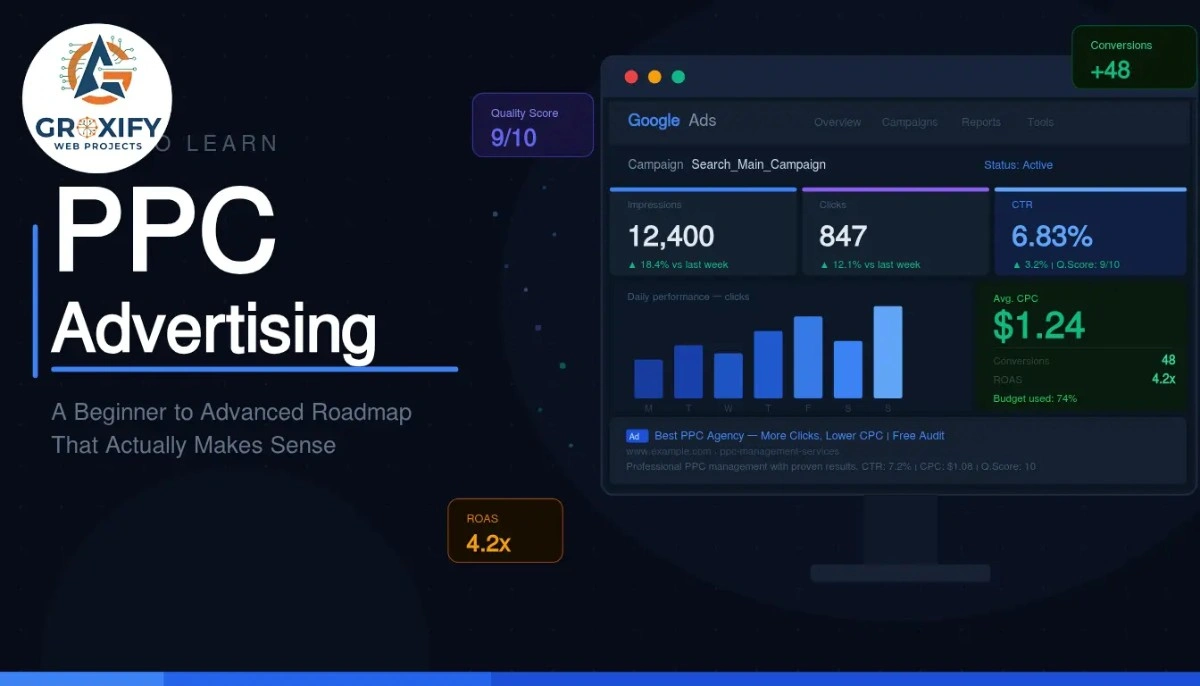
- CTR (click-through rate): The percentage of people who saw your ad and actually clicked it. A measure of how compelling your ad is.
- Conversion: A desired action completed after clicking your ad, like a purchase, form submission, or phone call.
Two more worth knowing: an impression is every time your ad is displayed to someone (whether they click or not), and CPC (cost per click) is simply how much you pay each time someone clicks your ad.
Once you know these cold, the interface starts making sense almost on its own.
The Beginner Phase: What to Actually Focus On
This is where most learners get stuck. They read endlessly but never run a real campaign. Or they run one with no structure and wonder why it is burning money with nothing to show.
The good news: once you learn PPC ads at the foundational level, intermediate skills start clicking into place quickly. But the beginner phase has three real priorities.
Keyword Research for PPC
Keyword research in PPC is different from SEO. In SEO (search engine optimization, where you write content to rank on Google for free over time), you focus on long-term traffic volume. In PPC, every click costs money. So you need keywords that signal buying intent, not just curiosity.
Start with what your customer would type when they are ready to act. Words like “buy,” “hire,” “near me,” “cost of,” and “best” usually mean the person wants something, not just information.
Use Google’s Keyword Planner (free inside Google Ads) to see search volume, which is how many people search a term per month, and the estimated cost per click for that term. This tells you quickly whether a keyword is worth targeting at your budget.
Also learn about match types, which control how closely someone’s search has to match your keyword before your ad shows:
- Broad match: Widest reach, but your ad can show for loosely related searches that waste budget.
- Phrase match: Your ad shows when the search includes your keyword phrase in order.
- Exact match: Your ad shows only when the search matches your keyword very closely.
Beginners often start with broad match and wonder why they are paying for irrelevant clicks. Start with phrase or exact match while you are learning. You can open up later once you have data.
Writing Ad Copy That Actually Gets Clicked
Ad copy is the text of your ad, what people read before they decide to click or scroll past. Google Search ads have three main parts: the headline (shown in blue, up to 30 characters), the description (shown below, up to 90 characters), and the display URL (the web address shown, which you can customize to look clean).
The mistake most beginners make is writing about themselves. “We offer premium quality services since 2010.” Nobody cares. Write about the customer’s problem and what they get. “Get Your Kitchen Fixed Today. Same-Day Plumbers Available.” That is an ad that earns the click.
Clarity beats cleverness every single time in PPC.
Understanding Quality Score
Quality Score is Google’s rating of how relevant your ad, keyword, and landing page are to each other. It goes from 1 to 10, and it directly affects two things: how often your ad shows up and how much you pay per click.
A landing page is the webpage someone lands on after clicking your ad. It has to match what the ad promises. If your ad says “Same-Day Plumbers” but the landing page is a general home services page, your Quality Score drops and your costs go up.
Higher Quality Score means lower cost and better placement. This is why learning PPC properly from the start actually saves you money over time.
How to Learn PPC Advertising Without Wasting Real Money
This is the part most guides skip. It is also the part beginners care about most because the fear of losing money is real and very reasonable.
Start Smaller Than You Think
You do not need a big budget to learn. Start with enough to get 50 to 100 clicks on a campaign. Depending on your niche and location, that might be a few thousand rupees or the equivalent in your currency. What you learn from real clicks, real data, and a real live campaign is more valuable than any course.
Set a daily budget cap inside the platform. Google Ads and most other platforms let you put a hard ceiling on daily spend. Use it from day one. No surprises.
Google Skillshop: Free and Actually Good
Google offers a free certification program called Google Ads Skillshop. It covers Search, Display, Shopping, and Video campaigns. These are not deep masterclasses, but they give you a structured foundation and a certificate that carries real weight when you are pitching clients or applying for marketing roles.
More importantly, they teach you how Google’s platform thinks. That mental model makes every other resource you find much easier to absorb.
Go through the Search Ads module first. Do the practice questions. Then run a small real campaign alongside it. Theory and practice at the same time is the fastest way to learn.
Intermediate Skills That Separate Learners from Practitioners
Once you have run a few campaigns and you are reading your own data regularly, you move into intermediate territory. This is where learning PPC online starts to feel less like theory and more like something you actually own.
Bidding Strategies: When to Use Which
Bidding is how you tell Google what outcome you are optimizing for and how much you are willing to pay. As a beginner, you start with manual CPC, where you set the maximum you will pay per click yourself. As you collect data, you shift to automated strategies that let Google’s algorithm do more of the work.
| Bidding Strategy | What It Optimizes For | Best Used When |
|---|---|---|
| Manual CPC | Your set maximum per click | New campaigns with little data |
| Maximize Clicks | As many clicks as possible | Driving early traffic |
| Target CPA | Conversions at a specific cost | You have 30 to 50 conversions of history |
| Target ROAS | Revenue earned per rupee spent | E-commerce with consistent purchase data |
CPA stands for cost per acquisition, meaning how much you pay on average to get one customer or lead. ROAS stands for return on ad spend, meaning for every rupee you put in, how many rupees in revenue you get back.
Do not rush to automated bidding. Those strategies need data to work. Run manual CPC until you have at least 30 to 50 conversions tracked in a campaign, then consider switching.
Conversion Tracking: Set This Up on Day One
Conversion tracking is how you tell Google what counts as a success. A purchase, a form fill, a phone call. Without it, you have no idea which clicks are actually turning into business. You are just watching money leave.
Most platforms use a small piece of code called a tag that you place on your website’s thank-you page. When someone completes the desired action and lands there, it registers as a conversion. If you use WordPress, Google Tag Manager handles this without you needing to touch any code directly. Tag Manager is a free Google tool that lets you add and manage tracking tags through a simple interface.
Set this up before spending a single rupee on ads.
Negative Keywords: Your Most Underused Tool
Negative keywords are search terms you tell Google to never trigger your ads for. This is one of the most powerful tools in PPC and one of the most ignored by beginners.
If you sell premium coffee machines and your ads keep showing for “free coffee,” that is wasted money. Adding “free” as a negative keyword stops that from happening.
Check your search terms report every week. This report, found inside Google Ads, shows you the exact phrases people typed before clicking your ad. Anything irrelevant goes onto your negative keyword list. This one habit alone can cut wasted spend by 20 to 30 percent on a messy campaign.
Advanced PPC: Where Real Performance Comes From
At the advanced level, you stop thinking about individual campaigns and start thinking about the full picture: who your audience is, when they are most likely to act, and how to build systems that keep improving.
Audience Layering on Search Campaigns
Even on Google Search, where ads are triggered by keywords, you can layer audience data on top. This means you can adjust your bids depending on who is searching, not just what they are searching.
For example: someone who already visited your website and is now searching your keyword again is far more likely to convert than a first-time searcher. You can bid higher for that group specifically. This is called audience layering, and it is a technique most beginners have never heard of. Once you apply it, cost per conversion usually drops noticeably.
Remarketing
Remarketing means showing ads to people who already visited your website or engaged with your brand. They are a warm audience. They already know you exist, so they convert at a higher rate and a lower cost than cold audiences.
Google’s Display Network, the system that shows banner-style ads across millions of websites and apps, is where most remarketing campaigns run. Setting one up takes a few hours. The returns on ad spend are typically better than any cold-audience campaign you will run.
Account Structure: The Thing Nobody Talks About
How you organize your campaigns and ad groups matters more than most beginners realize. Poor structure makes optimization hard and messy. Good structure makes improvements almost automatic.
One simple rule that changes everything: one theme per ad group. If you sell running shoes, trainers, and sandals, those should be three separate ad groups, not one. Each ad group should have its own tightly grouped keywords, its own ads, and point to its own specific landing page.
This keeps Quality Scores high, costs low, and data clean. It is not exciting to set up. It pays off every single day after that.
Course or Free Learning: Which Path Is Right for You?
Honest answer: you can learn PPC entirely for free. Google Skillshop, YouTube tutorials, and hands-on campaign practice will get you there. But it takes longer and you will make more expensive mistakes along the way.
A paid course speeds things up if it is structured, practical, and taught by someone who has actually managed real campaigns with real money on the line.
| Learning Path | Cost | Time to Basic Proficiency | Best For |
|---|---|---|---|
| Free (Skillshop + YouTube + Practice) | Zero | 3 to 6 months | Self-starters, tight budgets |
| Paid Structured Course | Varies | 4 to 8 weeks | Freelancers, career changers |
| Agency or On-the-Job Training | Paid by employer | 2 to 3 months | Those already in a marketing role |
| 1-on-1 Mentorship or Coaching | Premium cost | 4 to 6 weeks | Business owners needing fast results |
If you go the free route, be intentional about it. Follow a structured sequence and do not jump around. Skillshop first, then YouTube for specific gaps, then a real campaign, then analyze and repeat.
How to Learn PPC Marketing as a Freelancer or Business Owner
The goal is different depending on who you are, and that changes how you should approach the learning.
If you are a freelancer: you are learning PPC to manage other people’s budgets. That means you need to be confident at setup, clean with reporting, and able to explain results in plain language. Get certified through Skillshop, then offer a discounted (or free) campaign to a local business in exchange for real hands-on experience. One real campaign with real data is worth five courses.
If you are a business owner: you probably do not need to become an expert. You need to understand PPC well enough to set up a basic campaign, read the reports, and know when someone managing your ads is doing good work or not. That level of understanding takes two to four weeks of focused time.
Groxify Web Projects regularly sees business owners who hired agencies without understanding PPC basics. They had no way of evaluating whether the work was actually effective. Even a small amount of knowledge protects your budget and gives you the confidence to ask the right questions.
Mistakes That Set Learners Back
Most of these are not obvious in the beginning. That is exactly why knowing them early saves you money and frustration.
- Starting campaigns before setting up conversion tracking. You will have no idea what is actually working.
- Using broad match keywords too early. Your budget will go toward irrelevant searches faster than you realize.
- Ignoring the search terms report. This is where the real learning happens in every campaign you run.
- Changing campaigns too frequently. Data needs time. Let a campaign run for at least 7 to 14 days before drawing any conclusions.
- Treating PPC as a one-time setup job. The real work is in the weekly review, the testing, and the small consistent adjustments over time.
How Long Does It Actually Take
To run a basic campaign with confidence: two to four weeks.
To manage campaigns consistently and actually understand the data you are looking at: two to three months of real practice.
To call yourself genuinely skilled at this: six months to a year of hands-on campaign management.
These timelines assume you are doing it, not just reading about it. The gap between knowing PPC and doing PPC is where most people stay stuck for months. Running a real campaign, even a small one on a tight budget, teaches you more in one week than a month of passive studying ever will.
Conclusion
The single most important thing to take from this: PPC is a skill, not a setting. You do not set it and forget it. You learn by running, reviewing, adjusting, and running again. Pick one platform, start small, track everything, and do not skip the boring parts like account structure and negative keywords. Those are exactly where the real results hide. Now that you know how to learn PPC advertising properly, the next step is simple. Open the platform and start.
FAQ Section
Google Ads is the best starting point. Search campaigns have clear intent, the results are easy to measure, and Google offers free certification through Skillshop. Once you are confident there, you can move to Meta Ads or other platforms.
You can learn with a small budget, just enough to generate 50 to 100 real clicks. Depending on your niche, that could be a few thousand rupees or equivalent. The goal in the learning phase is getting real data, not scale.
No. PPC is managed through dashboards, not code. You will need to place a basic tracking tag on your website, but Google Tag Manager handles that through a simple interface without any coding knowledge required.
SEO earns free traffic from Google by ranking content over time. PPC pays for each click immediately. SEO takes months to show results. A well-set-up PPC campaign can start driving traffic the same day it goes live.
Basic campaign setup takes two to four weeks. Reading data confidently and optimizing consistently takes two to three months of hands-on practice. Real skill comes after six months or more of managing live campaigns.
Yes, especially for freelancers and people building a marketing career. It signals platform knowledge to clients and employers. More importantly, the training itself gives you a structured foundation before you spend real money on campaigns.
Learn the basics first regardless. Even if you plan to hire someone, understanding PPC lets you evaluate whether their work is actually good. Business owners who go in blind are far more likely to get poor results from agencies.
A CTR between 3 and 5 percent is generally solid for search campaigns. Anything below 1 percent usually means the ad copy or targeting needs work. CTR varies by industry, so track your own trend over time rather than chasing a fixed number.
Complete Google Skillshop training first. Then run a real campaign with a strict daily budget cap and low-competition keywords. Your goal in the practice phase is learning the platform and understanding data, not generating volume.
Focus on four: impressions (how often your ad showed), clicks, CTR (click-through rate, which shows ad effectiveness), and conversions. Once conversion tracking is live, cost per conversion becomes the most important number to watch and improve.

Rohit Singh is the Founder of GROXIFY WEB PROJECTS LLP with many years of hands-on experience in digital marketing, including SEO, PPC, social media, email marketing, content writing, and WordPress development. He has worked with global clients across industries and helped businesses achieve 5x–10x revenue growth through data-driven strategies and practical execution. Rohit actively manages digital teams, builds business strategies, plans marketing systems, and oversees execution to drive consistent traffic, leads, and long-term business growth.