You sign up for a free trial somewhere. Within two minutes, you get a welcome email. The next day, a tips email. Three days later, a case study that answers exactly what you were wondering. None of that was a person sitting at a desk hitting send. That is email marketing automation doing its job.
Table of Contents
This article covers what it actually is, how the whole system works behind the scenes, which tools run it, what AI is now changing, and what to set up first if you are starting from zero. No fluff. Just the full picture.
What Is Email Marketing Automation
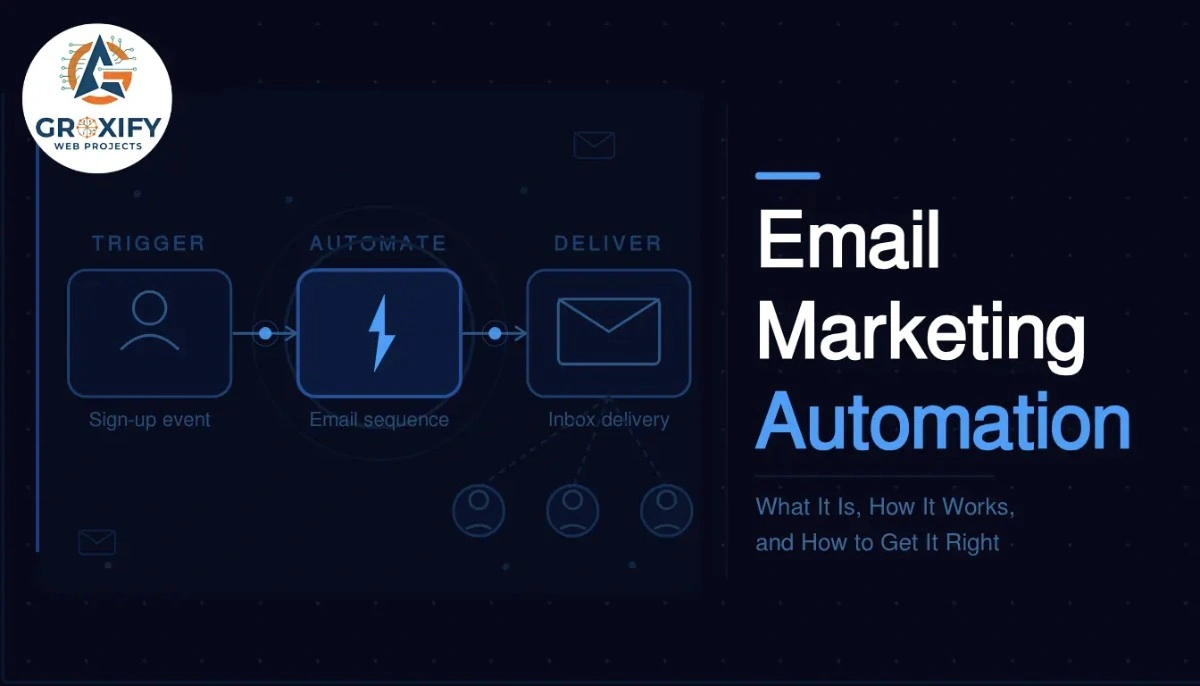
Email marketing automation is a system that sends emails to your subscribers automatically, based on actions they take or time intervals you set. Instead of manually sending every email, you build the sequence once and the system handles delivery on its own.
The key idea is triggers. A trigger is the action or condition that starts an email sending. Someone signs up for your newsletter, that is a trigger. They abandon a shopping cart, that is a trigger. They have not opened an email in 60 days, that is a trigger too.
Once triggered, the system follows a workflow. A workflow is a pre-built path of emails and conditions. It decides which email goes out next, how long to wait, and sometimes which version to send based on what the subscriber did.
The Three Moving Parts
Every automation runs on three things: a trigger, a condition, and an action.
The trigger is what starts it. The condition is the rule that shapes what happens, for example, “only send this if they clicked the last email.” The action is what actually goes out, usually an email, but it can also be a tag added to their profile or a notification sent to your team.
Once you understand this, the whole thing stops feeling complicated. You are just setting rules. If this happens, do that. That is it.
Why Businesses That Use This Do Not Go Back
The obvious benefit is time saved. You set up a welcome series once, and every new subscriber gets it automatically. You never have to remember to send it. But the bigger reason people stick with automation is consistency.
Manual sending is uneven. You send when you remember, when you have time, when the mood is right. Automation does not care about any of that. It sends at the exact right moment, every time.
And here is something competitors rarely say out loud: automation catches revenue you would otherwise just miss. A person adds something to their cart and leaves. Without automation, that sale is gone. With a well-timed abandoned cart email, an email sent automatically when someone leaves without buying, a solid percentage of those people come back and complete the purchase.
Businesses using automation consistently report better open rates and better conversions compared to one-off campaigns. Not because the writing is better. Because the timing is right.
The Emails That Actually Get Automated
You could technically automate anything, but most businesses start with a few high-value sequences.
The welcome series is the most common. Someone subscribes and they get two to four emails over a week that introduce your brand, set expectations, and deliver something valuable. This is your first impression, and it runs automatically for every single new subscriber.
Abandoned cart emails go out when someone adds items to a cart but does not complete the purchase. Sent within an hour of abandonment, they recover sales that would otherwise disappear. The first hour is when return rates are highest.
Re-engagement sequences target subscribers who have gone cold, meaning they have not opened emails in a set number of weeks. A short series of two to three emails tries to bring them back. If they still do not respond, most setups remove them from the active list to keep delivery health strong.
Post-purchase flows go out after someone buys. Think: order confirmation, then a tips email on using the product, then a review request. All automated, all timed to feel helpful rather than pushy.
Birthday and anniversary emails are smaller but genuinely effective. If you collected a subscriber’s birthday, sending a personalized email with an offer on that day feels real. Subscribers respond because it does not feel like a mass broadcast.
How Email Marketing Automation Actually Works Step by Step
Most articles go vague here. Here is the actual process from scratch.
- Pick an email marketing tool. This is the platform that stores your contacts, builds your workflows, and handles delivery.
- Connect it to your website, store, or CRM. A CRM is a customer relationship management system, basically a database of your contacts and their activity.
- Build your contact list or import one. Every subscriber must have opted in, meaning they gave clear permission to receive emails from you.
- Set up a trigger. For example: “when someone fills out the signup form on my homepage.”
- Build the email sequence. Write the emails, set the wait times between each one, and add conditions if needed.
- Activate the workflow and let it run.
- Check the reports after a few weeks. Open rate (percentage of subscribers who opened the email), click rate (percentage who clicked a link inside), and unsubscribe rate (percentage who opted out) tell you what is working and what is not.
The tool handles scheduling, delivery, and tracking automatically. Your job is to monitor and improve over time.
Picking the Right Email Marketing Software
The tool you pick matters more than most people think, because switching later is painful. Your workflows, contacts, and data all live inside it, and migrating everything takes real effort.
Here is an honest comparison of the most common options:
| Tool | Best For | Starting Price | Automation Depth |
|---|---|---|---|
| Mailchimp | Beginners, small lists | Free up to 500 contacts | Basic to intermediate |
| ActiveCampaign | Advanced automation, CRM built in | Paid from around $15/month | Deep and flexible |
| ConvertKit | Creators, bloggers, solopreneurs | Free up to 1,000 subscribers | Good visual workflows |
| Klaviyo | Ecommerce stores | Free up to 250 contacts | Strong for Shopify users |
| Brevo | Budget-conscious businesses | Free up to 300 emails/day | Solid for the price |
The honest take: Mailchimp is fine to start, but businesses that grow into serious automation usually outgrow it. ActiveCampaign costs more but handles complex logic much better. If you run an ecommerce store, Klaviyo connects deeply with platforms like Shopify and already understands your customers’ buying behavior without extra configuration.
Pick based on where you are going, not just where you are now. That single decision saves a painful migration later.
What Email Marketing AI Tools Are Actually Doing Now
This is the section most articles either skip or get wrong. AI in email marketing is not just writing subject lines for you. It is changing how the whole system thinks.
Traditional automation follows rules you set. If they clicked, send this. If they did not, wait. AI-powered email marketing tools go further. They look at behavior patterns across your entire subscriber list and make decisions based on what they predict will work, not just what happened last time.
Predictive send time optimization is one clear example. Instead of you deciding to send at 10 AM on a Tuesday, the system looks at when each individual subscriber has historically opened emails and sends it at their personal best time. Not the average time for your list. Their specific time.
AI is also being applied to subject line testing, dynamic content (content inside an email that changes based on who is reading it), and churn prediction (identifying subscribers who are likely to unsubscribe before they actually do, so you can act first).
The Email Marketing AI Agent
An email marketing AI agent is a step beyond standard automation. A regular workflow runs the rules you set. An AI agent monitors performance, identifies what is underperforming, and in some setups adjusts or flags campaigns without waiting for you to notice the problem manually.
This is still an emerging feature. Platforms like Klaviyo and ActiveCampaign have started rolling out AI agent capabilities, mainly aimed at ecommerce businesses with large lists. For most small and mid-size businesses, the impact is limited until your list is big enough for real patterns to emerge.
For a list under 2,000 subscribers, basic automation rules will get you 90% of the results. AI adds real value at scale. That is the honest version.
What Actually Goes Wrong With Automation
Setting up automation is one thing. Getting it to work well is another. These are the mistakes that quietly kill results and nobody warns you about:
- Sending too many emails too fast. A welcome series of seven emails in five days feels aggressive. Subscribers opt out. Give people breathing room between sends.
- Not segmenting. Segmenting means grouping subscribers by something relevant, like what they signed up for or what they have purchased. Sending the same automation to everyone wastes the whole point of behavioral targeting.
- Using the wrong trigger. If your purchase confirmation email fires for both first-time and returning customers, the messaging feels off. Match the trigger to the context exactly.
- Forgetting to test. Run through your own workflows as a test subscriber before going live. Broken links and mis-timed delays happen more often than you expect.
- Setting it and forgetting it. Automation is not a one-time setup. Open rates shift, subscriber behavior changes, and what worked 12 months ago may not work now. Review your sequences at least once a quarter.
The thing is, none of these are hard to avoid. They just require attention, not technical skill.
Where to Start If You Have Never Done This
If you are new, do not try to build everything at once. That is how people set up one half-finished automation and abandon the whole idea.
Start with one workflow: the welcome series. Build three emails. The first goes out immediately after someone subscribes. It introduces who you are and delivers whatever you promised, a free guide, a discount, useful content. The second goes out two days later with something genuinely helpful. The third goes out four days after that with a soft next step, maybe asking them to reply, follow you somewhere, or check out your best content.
Three emails. One trigger. Activate it, watch the numbers for a month, then build the next one.
Once the welcome series is running, the next priority for most businesses is an abandoned cart flow (if you sell anything) or a re-engagement sequence (if you have a list that has been sitting quiet for a while).
At Groxify Web Projects, we have seen businesses get strong results from just two well-built automations before touching anything more advanced. Complexity is not the goal. Results are.
The Part Most People Overlook
Automation amplifies what is already in your emails. If the writing is cold, generic, or too promotional, automation just delivers that at scale. The sequences that actually work feel like they were written for one person, not broadcast to thousands. That is the skill worth developing alongside the technical setup.
Email marketing automation is not as complicated as it looks from the outside. You set a trigger, build a sequence, and let the system handle the sending. The real skill is writing emails that feel personal even when automated, and building workflows that match how your subscribers actually behave. Start with a welcome series, pick a tool that fits where your business is heading, and improve based on what the data tells you. That is the whole formula. Now you have it.
FAQ
Email marketing automation is a system that sends emails automatically based on triggers like a sign-up, a purchase, or a set time interval. You build the sequence once, and the tool handles delivery and timing without any manual effort each time a subscriber qualifies.
Yes, especially for welcome emails and abandoned cart sequences. Even a small list benefits from consistent, well-timed emails. Most tools have free plans that cover the basics, so the barrier to entry is low and the return can be meaningful even at small scale.
A campaign is a one-time send to your whole list, like a newsletter or promotion. Automation is triggered by a specific action and sent to individual subscribers based on their behavior. Campaigns are broadcasts. Automation is personal, ongoing, and runs without manual effort each time.
Mailchimp is the most common starting point because of its free plan and simple interface. ConvertKit works well for creators and bloggers. For ecommerce, Klaviyo connects cleanly with Shopify and learns from purchase behavior without extra configuration.
Most tools offer a free tier for small lists, usually under 500 to 1,000 subscribers. Paid plans start between $10 and $30 per month and scale with list size. Advanced tools like ActiveCampaign start higher but offer significantly deeper automation and CRM features.
It can, if sequences are too frequent or not relevant. The fix is to segment your list by behavior or interest, keep emails useful rather than purely promotional, and give subscribers clear control over what they receive. Relevance is what separates good automation from spam.
Standard automation follows rules you set manually. Email marketing AI tools go further, predicting the best send time per subscriber, personalizing content dynamically, testing subject lines, and flagging sequences that are underperforming before you notice the drop yourself.
An email marketing AI agent is a system that not only runs automated workflows but monitors campaign performance and adjusts or flags issues without waiting for manual review. It is an emerging feature in platforms like Klaviyo and ActiveCampaign, currently most useful for larger lists.
Watch three numbers: open rate (how many opened the email), click rate (how many clicked a link inside), and unsubscribe rate (how many opted out). A consistent open rate above 20 percent and a low unsubscribe rate are generally signs that your sequences are landing well.
Start with your welcome series. Every new subscriber goes through it, so the impact is immediate. Build three emails, activate them, and monitor results for a month. Once stable, add an abandoned cart flow or a re-engagement sequence as your second automation.

Rohit Singh is the Founder of GROXIFY WEB PROJECTS LLP with many years of hands-on experience in digital marketing, including SEO, PPC, social media, email marketing, content writing, and WordPress development. He has worked with global clients across industries and helped businesses achieve 5x–10x revenue growth through data-driven strategies and practical execution. Rohit actively manages digital teams, builds business strategies, plans marketing systems, and oversees execution to drive consistent traffic, leads, and long-term business growth.